
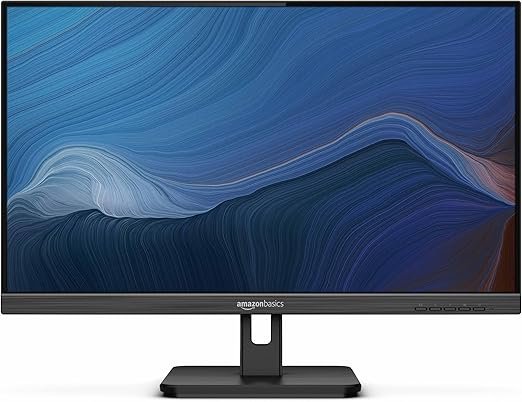
Finding a reliable and affordable computer monitor can be challenging, especially with the wide range of options available. While high-end gaming monitors or professional-grade displays often grab the spotlight, many users simply want a dependable, clear, and comfortable screen for work, entertainment, and casual gaming. The Amazon Basics 75Hz IPS Monitor addresses this need, providing excellent value at a budget-friendly price point.
In this review, we’ll take a closer look at its features, specifications, design, performance, pros and cons, and who this monitor is best suited for.
Key Features
The Amazon Basics 75Hz IPS Monitor is designed for users who want quality visuals without overspending. Here are its standout features:
- 75Hz Refresh Rate: Smoother motion than standard 60Hz monitors, ideal for casual gaming and streaming.
- IPS Panel Technology: Delivers wide viewing angles and accurate colors.
- Full HD Resolution (1920 x 1080): Crisp and clear visuals for everyday computing tasks.
- Slim Bezel Design: Modern, minimalist look with more screen space and less distraction.
- Tilt-Adjustable Stand: Allows for angle adjustments to improve comfort and reduce strain.
- Multiple Connectivity Options: Includes HDMI and VGA ports for compatibility with a range of devices.
- Anti-Glare Coating: Reduces reflections, making it easier to use in well-lit rooms.
- Energy Efficient: Built to minimize power consumption while maintaining performance.
Specifications
- Brand: Amazon Basics
- Panel Type: IPS (In-Plane Switching)
- Resolution: Full HD (1920 x 1080)
- Refresh Rate: 75Hz
- Aspect Ratio: 16:9
- Response Time: Approximately 5ms (ideal for everyday use)
- Ports: HDMI and VGA
- Stand Adjustments: Tilt only
- Design: Slim bezel, lightweight construction
- Size Options: Typically available in common display sizes (around 24 inches, depending on the model variation)
Design and Build Quality
The Amazon Basics 75Hz Monitor has a clean and minimalist design that fits seamlessly into home offices, dorm rooms, or living room setups. The slim bezels create an almost borderless effect, making it great for multi-monitor configurations. Its lightweight frame makes it easy to move or reposition, while the tilt-adjustable stand adds some flexibility in ergonomics.
While it doesn’t feature height or swivel adjustments like premium models, the design is stable and functional. The build quality is solid for its price range, with a sturdy base that minimizes wobble. The black matte finish gives it a professional look without attracting fingerprints or dust easily.
Display Quality and Performance
Resolution and Color Accuracy
With Full HD 1080p resolution, the monitor provides sharp images and vibrant colors suitable for web browsing, streaming, office applications, and light creative work. The IPS panel ensures wide viewing angles, meaning the picture quality remains consistent even when viewed from the side. This is a big advantage over TN panels, which often suffer from color distortion at off-angles.
Refresh Rate and Motion Handling
The 75Hz refresh rate gives it an edge over standard 60Hz monitors, providing slightly smoother visuals during scrolling, video playback, and casual gaming. While not a substitute for high-end 144Hz or 240Hz gaming monitors, it offers a noticeable improvement for budget-conscious users.
Response Time
With a response time around 5ms, it handles general use and casual gaming without significant motion blur. This makes it suitable for fast-paced games like shooters or racing titles, though professional competitive gamers may prefer monitors with faster response times.
Brightness and Anti-Glare
The monitor provides adequate brightness for indoor environments, paired with an anti-glare coating that reduces reflections. This makes it more comfortable for use in rooms with natural light or overhead lamps.
Connectivity and Compatibility
The inclusion of HDMI and VGA ports ensures compatibility with both modern and older devices. This flexibility is helpful for connecting desktops, laptops, game consoles, and even some media players. However, it lacks DisplayPort, which is common in more advanced monitors.
The monitor also works seamlessly with Windows, macOS, and most operating systems without the need for complex setup. Simply plug in your HDMI or VGA cable, and you’re ready to go.
Everyday Use Experience
Office and Productivity
For productivity, the Amazon Basics 75Hz Monitor performs well. The 1080p resolution is sharp enough for spreadsheets, documents, and multitasking, while the IPS panel reduces eye strain during long hours of use. Its slim bezels also make it practical for side-by-side dual-monitor setups, enhancing workflow efficiency.
Entertainment and Streaming
Streaming movies, shows, and videos is enjoyable thanks to its vivid colors and Full HD clarity. The 16:9 aspect ratio is standard for most media content, ensuring compatibility with platforms like Netflix, YouTube, and more.
Gaming
While not designed as a dedicated gaming monitor, it’s more than capable for casual gaming. The 75Hz refresh rate and 5ms response time keep visuals smooth enough for most games. For budget-conscious gamers who don’t need ultra-high refresh rates, this monitor delivers solid performance.
Pros
- Affordable Price: Great balance of performance and value.
- 75Hz Refresh Rate: Smoother motion than 60Hz models.
- IPS Panel: Wide viewing angles and accurate colors.
- Full HD Resolution: Crisp visuals for work and entertainment.
- Slim Bezel Design: Ideal for multi-monitor setups.
- Multiple Ports: HDMI and VGA for modern and older devices.
- Anti-Glare Screen: Comfortable for bright rooms.
- Energy Efficient: Reduces power consumption.
Cons
- No DisplayPort: Limits connectivity options for advanced setups.
- Limited Adjustability: Only tilt adjustment—no height, swivel, or rotation.
- Not for Competitive Gaming: Refresh rate and response time fall short of pro-level monitors.
- Speakers Not Included: Requires external speakers or headphones for audio.
- Plastic Build: While sturdy, it lacks the premium feel of higher-end monitors.
Who Is This Monitor Best For?
The Amazon Basics 75Hz IPS Monitor is ideal for:
- Students: Affordable and reliable for online classes, studying, and entertainment.
- Home Office Workers: Great for productivity tasks like emails, spreadsheets, and video calls.
- Casual Gamers: Offers smoother visuals than 60Hz monitors without breaking the bank.
- Budget-Conscious Buyers: Perfect for those who want solid features without paying for high-end extras.
- Multi-Monitor Users: Slim bezels make it excellent for dual or triple monitor setups.
It may not be the best option for:
- Professional Gamers: Who require ultra-high refresh rates and advanced response times.
- Graphic Designers and Editors: Who demand color calibration and 4K resolution.
- Premium Enthusiasts: Who prefer monitors with advanced ergonomic stands and additional ports.
Final Verdict
The Amazon Basics 75Hz IPS Monitor offers excellent value by combining crisp Full HD resolution, smooth 75Hz refresh rate, and wide-angle IPS technology in an affordable package. While it lacks advanced features like DisplayPort, built-in speakers, or professional-grade adjustments, it excels at what it’s designed to do: provide a dependable, comfortable, and budget-friendly viewing experience.
For students, remote workers, casual gamers, and anyone needing a straightforward everyday monitor, it’s a smart and cost-effective choice. It’s not the flashiest option, but it’s one that delivers reliable performance where it counts.